Qwickpharma Get QwickpharmaContact us

From the bed to the counter

Ordering software for your hospital’s licensed medical store. Patients send prescriptions from the bed; staff pack and hand over.

Who does what

Qwickpharma joins the three parties of an order inside a hospital: the patient at the bed, the licensed medical store that serves admitted patients, and the hospital around them.

At the bed

The patient or attendant

  • Scans the QR code on the bed
  • Photographs the prescription
  • Pays the store at hand-over

At the counter

The medical store

  • Sees the order on a live board
  • Packs it and marks it ready
  • Delivers to the bed or hands over at the counter
Around them, the hospital: attendants stay beside their patients, fewer people walk the wards, and its own pharmacy keeps the orders from its own beds.

Every store gets its own dedicated Qwickpharma at its own web address, with its own isolated environment and its own database. Nothing is shared between stores.

How we keep it private

Qwickpharma on the patient's phone: order #12 for Bed A-12 is packing. The same order marked ready, with a total of ₹860.00 and a message from the store. The same order handed over and paid.
Bed A-12, order #12 PackingReady, coming to the bedHanded over, paid

How it works

  1. First, we set up your own Qwickpharma.

    Your store gets a dedicated Qwickpharma at its own web address. You add your team and choose which tabs each person can open.

  2. Then print a QR code for every bed.

    Settings prints the codes. Each one opens your store’s Qwickpharma with the bed already filled in.

  3. Staff onboard a patient in seconds.

    Name, mobile number, bed, insurance and recorded consent. Qwickpharma prints a sign-in slip to hand over at the bed.

  4. The patient sends the prescription, and your counter takes it from there.

    The order lands on your live board with a chime. Staff pack it, mark it ready with the total, and deliver it to the bed or hand it over at the counter. The patient pays the store at hand-over, in cash or UPI, as your store accepts.

Sanjeevani Medicals

Navjeevan Hospital, store settings

Store
Accepting orders
Store phone
+91 20261 23456
Delivery to the bed
Bed QR codes
Print
Vikram JoshiAdminEvery tab
Priya KulkarniStaffBoard, Orders, Patients
Amit PawarStaffDashboard, Board

Sanjeevani Medicals

Bed A-12

Scan to send your prescription

Sanjeevani Medicals

Your Qwickpharma sign-in

Kiran Deshmukh, Bed B-15

Mobile
98000 00125
Password
valley2721

Valid until 5 Dec 2026

  1. Scan the QR code on your bed.
  2. Enter your mobile number and password.
  3. Send a photo of your prescription.

PackingUpdates live

#14New

Kavita JadhavBed C-08

InsuranceBed delivery

Mark readyOpen

#139 min

Fatima SheikhICU-2

InsuranceBed delivery

Sanjeevani MedicalsBed A-12

Order#12Sent 6:08 pm

Packing

The medical is packing your medicines.

Next: your medicines will be ready.

PackingReadyHanded over

One order, both ends

Press the store’s buttons. The patient’s phone at the bed changes the moment staff act, and so does every other screen in the store.

Staff can undo a step within 60 minutes, and every step is kept with the name of who took it.

  1. Packing
  2. Ready
  3. Handed over

For the patient

Nothing to download and nothing to queue for. The phone they already have is enough.

Sign in with the slip

The QR code on the bed opens the store’s Qwickpharma. The patient or attendant signs in with the mobile number and password from the printed slip. It works in the browser of any phone, and can be added to the home screen like an app.

The patient sign-in screen, with the bed number already filled in from the QR code.

Photograph the prescription

Up to three photos or PDFs per order, with crop and rotate so the store can read every line, and a note for the store.

Cropping a photo of a prescription before sending it.

Follow it live

Packing, Ready and Handed over, or Rejected with the reason. A notification arrives when the order is ready, whether it comes to the bed or waits at the counter, and one tap calls the store.

Two orders in progress on the patient's phone, one packing and one ready with its total.

Every order, kept

Order history with totals and the store’s messages, in light or dark mode.

The patient's order history.
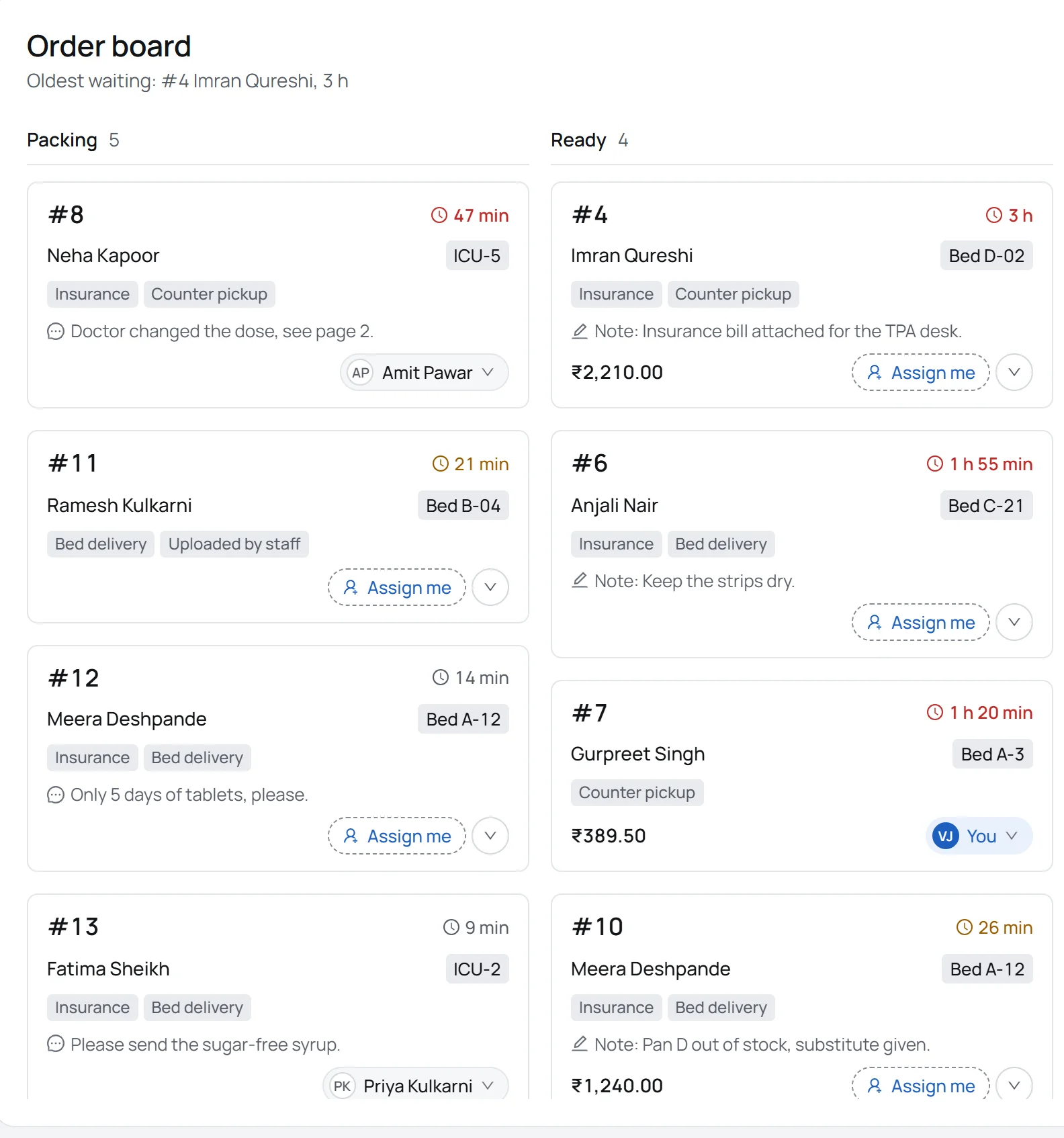
The store's live order board: the Packing and Ready columns, each order with its number, patient, bed and how long it has waited.
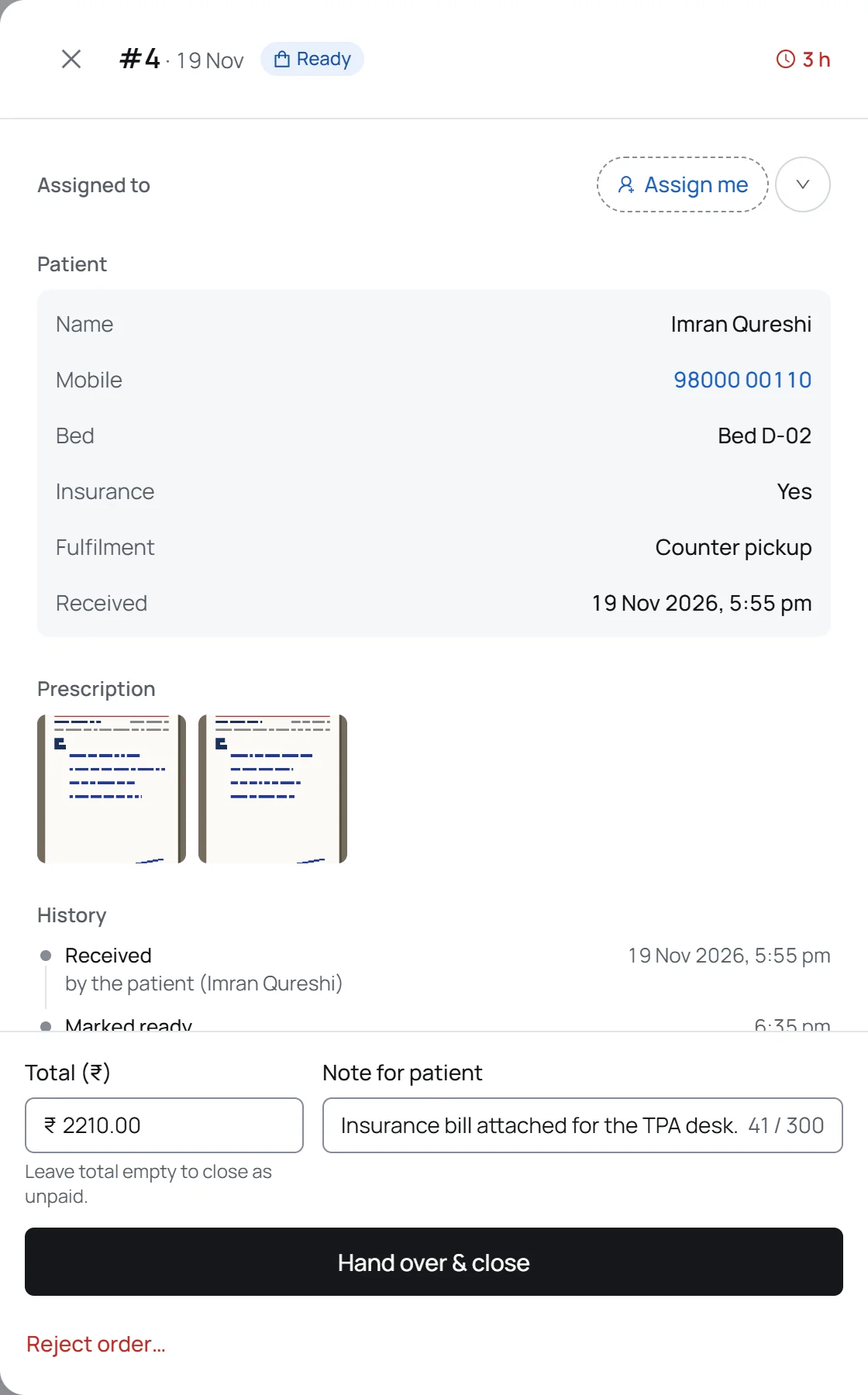
An order drawer: the patient's details, the prescription images, the history of who did what, and the hand-over controls.
A new patient login: the mobile number, a one-time password and the Print slip button.
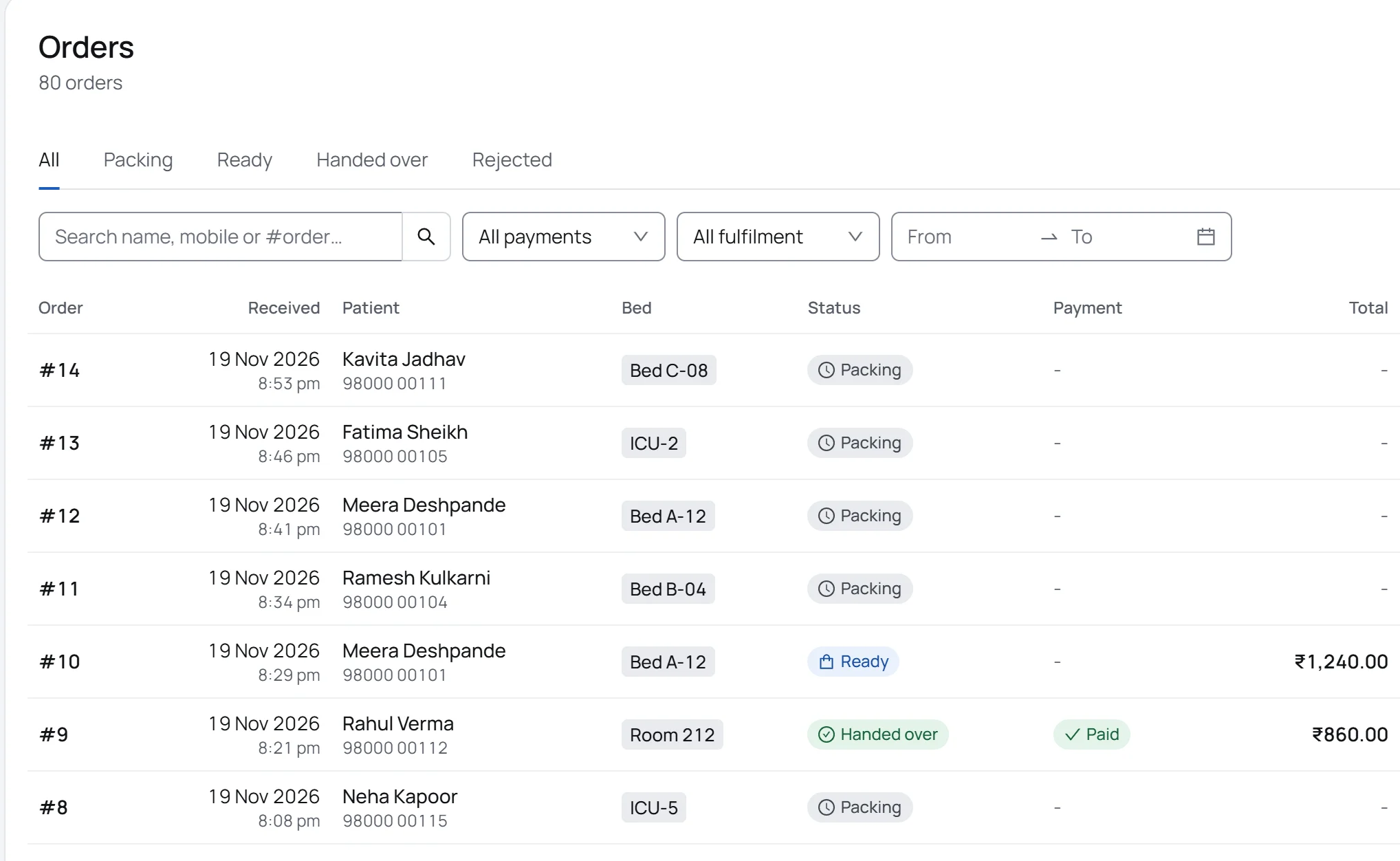
The Orders tab with search, payment and fulfilment filters, a date range and a list of today's orders.
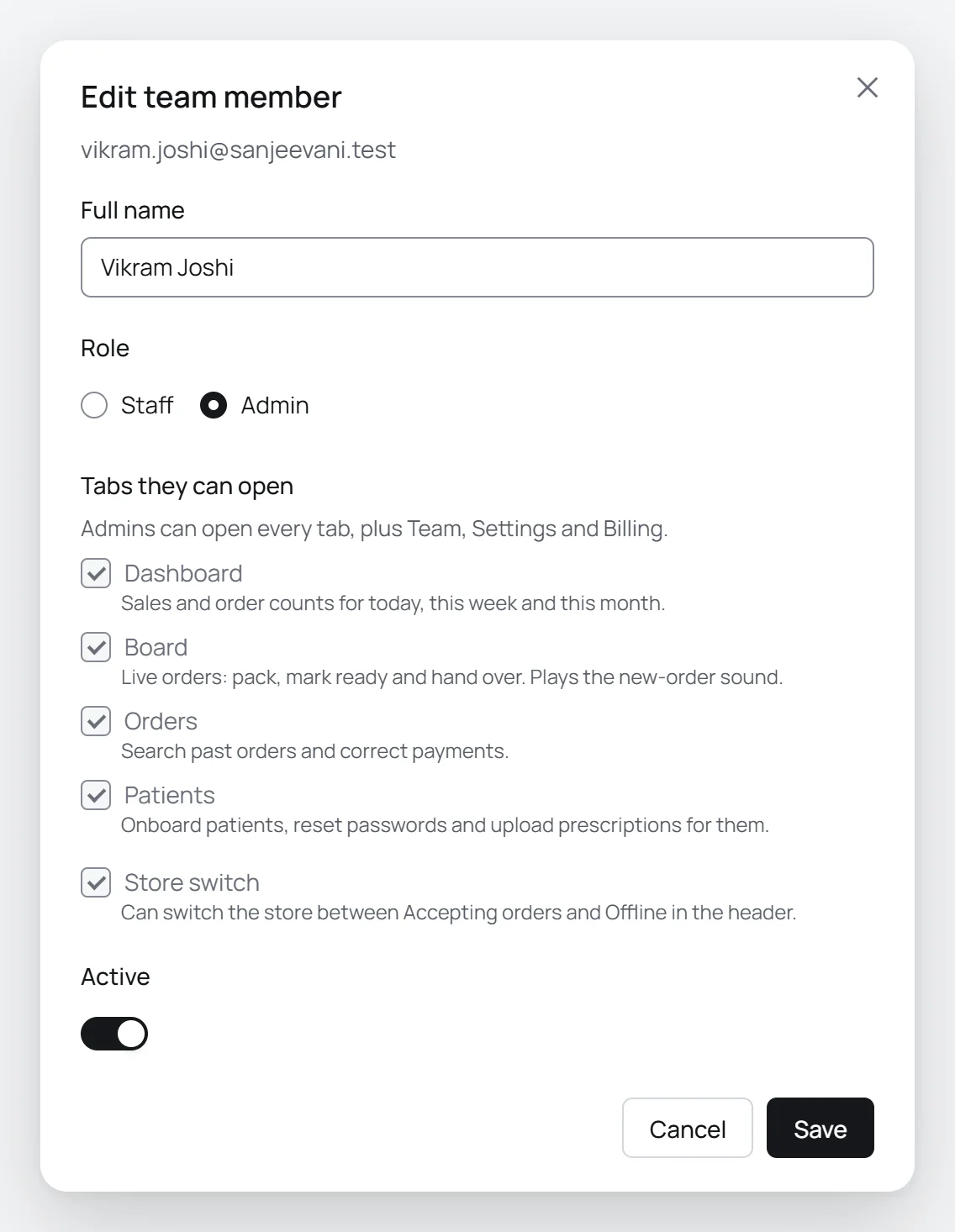
Editing a team member: role, the tabs they can open and the store switch permission.

For the store

Orders from admitted patients that might otherwise go outside, in an orderly digital queue instead of phone calls and paper, on the phones, tablets and PCs you already have.

A live board for every order

Packing, Ready and Closed, in sync on every device in the store the moment anything changes. A new order chimes and lights up, and the board keeps the screen awake.

Everything about an order in one drawer

Zoom into the prescription, mark it ready with the total and a note, hand it over as paid or unpaid, or reject it with a ready-made reason. Undo a step within 60 minutes. The history shows who did what, and when.

Patients onboarded in seconds

Consent is recorded at onboarding and the credentials slip prints at once. Access lasts 20 days and can be extended; staff can reset a password, upload a prescription for a patient, or mark them discharged, which also happens on its own after 45 days without a sign-in.

Every order, searchable

Search, filters and a date range, with CSV export. The dashboard shows today’s paid and unpaid totals and what is packing and ready right now.

Your team, your rules

Admins add staff with a temporary password that is changed at first sign-in, choose which tabs each person can open, and who may switch the store between Accepting orders and Offline. Going Offline lets orders in progress finish, and every device shows who made the change. Members can be removed and added back without losing their history.

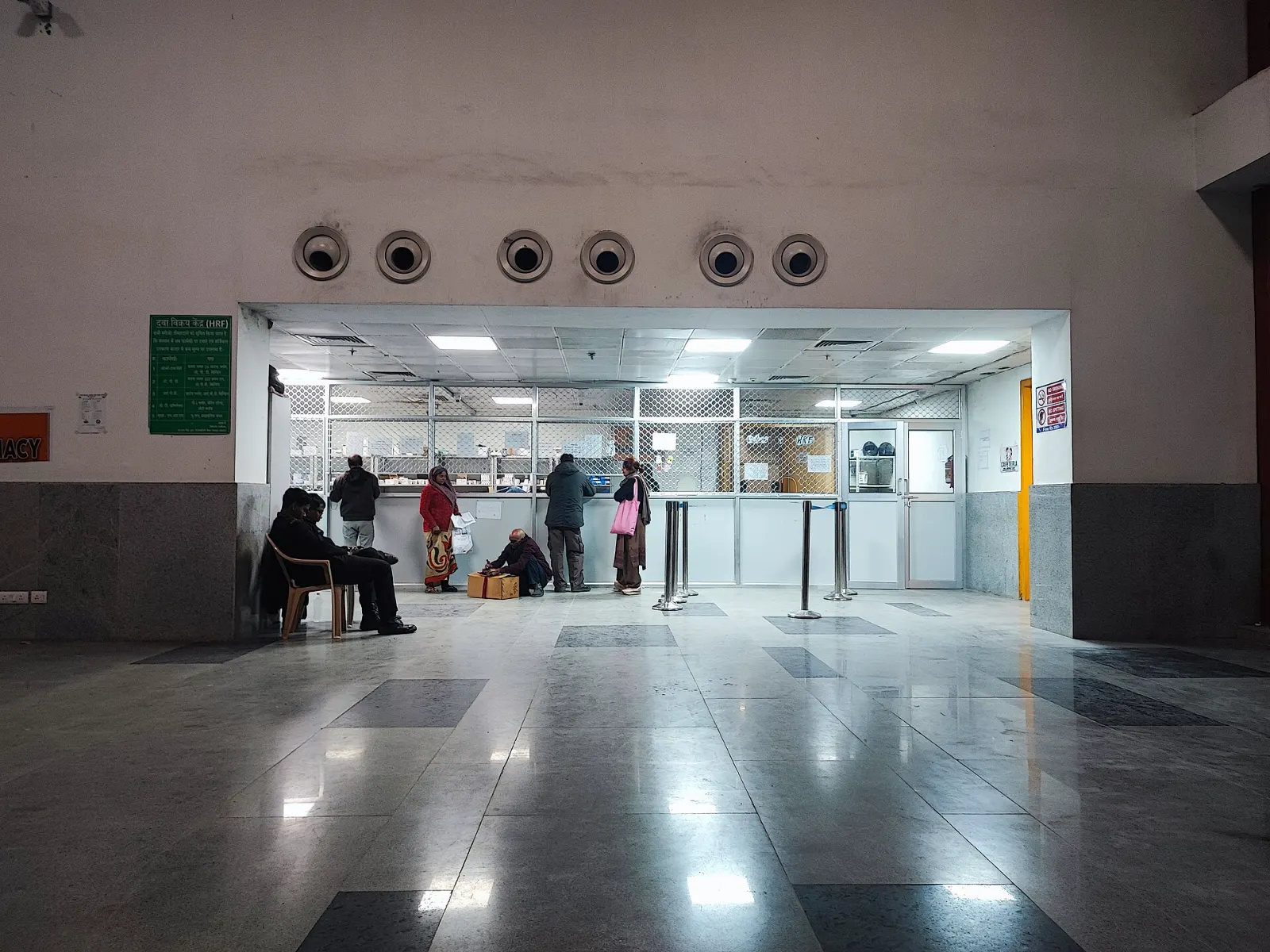
People waiting at the windows of a hospital pharmacy counter, with chairs along the wall and a polished stone floor.
A hospital pharmacy counter in India.

For the hospital

The store runs Qwickpharma. The hospital gets calmer wards.

Attendants stay with patients

The prescription leaves from the bed, so the attendant stays there instead of queueing at the pharmacy.

Fewer people in the wards

Fewer trips between the wards and the counter, and fewer people moving through corridors to ask whether an order is ready.

A modern service at the bedside

Admitted patients and their families follow every order on their own phone, from the moment it is sent to the hand-over.

Demand stays in-house

Orders from the hospital’s own beds go to the hospital’s own pharmacy.

Security

Prescriptions are medical records. Qwickpharma keeps each store’s data on its own, keeps it only as long as needed, and keeps out everyone who should not see it.

A Qwickpharma of your own

Each store gets its own isolated environment, its own database and its own web address. Nothing is shared between stores.

Consent at onboarding

Staff record the patient’s consent when they create the login, and the slip tells the patient how their details are used.

Deleted after a year

Orders and prescription images are deleted automatically one year after their last update.

Logins that expire

Patient access lasts 20 days and staff can extend it. A discharged patient can no longer sign in, and a patient who has not signed in for 45 days is discharged automatically.

Permissions checked by the server

Roles and tab permissions are enforced on the server for every request, not just hidden on the screen.

Passwords kept as one-way hashes

Passwords are stored only as one-way hashes. Staff replace their temporary password the first time they sign in.

No ads, no trackers

No advertising, no tracking scripts and no selling of data. Every connection uses HTTPS.

Free trial

For a store that wants to see it working with its own team first.

We set up your dedicated Qwickpharma, you add your team and print the bed QR codes, and patients can start sending prescriptions.

Free

to start

Start a trial

Prepaid plans

Simple plans paid in advance by card or UPI. No auto-debit.

Every feature on this page, your own isolated environment and database, and your own web address. Nothing renews by itself: you choose when to pay for the next plan.

Talk to us

for pricing

Ask for pricing

Questions

Is Qwickpharma a pharmacy?

No. Qwickpharma is ordering software used by a licensed medical store inside a hospital. The store dispenses the medicines; Qwickpharma sells none and gives no medical advice.

Who do patients pay?

The medical store, at hand-over, in cash or UPI as the store accepts. Qwickpharma never takes payments from patients.

Is it for emergencies?

No. Qwickpharma is for everyday orders from admitted patients. In an emergency, the ward staff and the hospital’s own emergency services are the right people to call.

Do patients need to install an app?

No. The QR code on the bed opens Qwickpharma in the phone’s browser. Patients can add it to the home screen to get notifications, but they do not have to.

What if the patient cannot use a phone?

An attendant can sign in with the same slip on their own phone, and staff can upload a prescription for the patient from the Patients tab.

What does the store need?

The phones, tablets and PCs it already has, and any printer for the bed QR codes and sign-in slips. There is no other hardware.

How long does setup take?

Not long. We create your dedicated Qwickpharma, you add your team and print the QR codes, and you are ready for the first order.

What happens when the store goes Offline?

New orders pause. Orders already in progress can still be finished, and every device sees the change with the name of who made it.

How long do patients keep access?

Twenty days from onboarding, and staff can extend it. A patient who is discharged, or who does not sign in for 45 days, can no longer sign in.

Is our data kept apart from other stores?

Yes. Each store gets its own isolated environment and its own database. Nothing is shared between stores.

What does it cost?

There is a free trial, then simple prepaid plans paid by card or UPI, with no auto-debit. Talk to us for pricing.

Can we stop?

Yes. Plans are prepaid and never renew by themselves. See Refunds and cancellation.

Get Qwickpharma

Tell us about your medical store. We will get back to you about a free trial and pricing.

What happens next

  1. We reply by email or phone.
  2. We set up your store’s own Qwickpharma for the free trial.
  3. You add your team, print the bed QR codes and take the first order.

10 digits, starting with 6, 7, 8 or 9

Street and area

0 / 1000